
Have these ready
Photo ID
A government-issued photo ID. Digital IDs and screenshots are not accepted.
Proof of address
A bank statement (recommended), utility bill or government document from the last 3 months.
USD 500 in one deposit
Your own money, in your own Vantage account. Several smaller deposits that add up to $500 don't count.
Who can enter
- You are 18 or older.
- You are not a resident of the United States, the United Kingdom, Australia or Canada.
- One entry per person: one Vantage account and one strategy.
- Your Vantage account is under the Guild Academy IB: opened through our registration link, or transferred to our IB.
Get your Vantage account under Guild Academy
Your contest account must sit under the Guild Academy IB. First, tell us whether you already have a Vantage account.
Choose one to see your steps.
1.1Create your account
- Open the Guild Academy registration link (button below).
- On the Email tab, choose your country of residence and enter your email address.
- Choose a password (8–16 characters, case-sensitive) and select Sign Up.
- Enter the one-time codes sent to your email and phone.
Open the detailed walkthrough ↗
Use the web portal for the whole set-up; avoid links that switch you to the Vantage app mid-way.
1.1Transfer your account to the Guild Academy IB
- Close all open positions first. Vantage asks you to confirm this before transferring.
- Log in to the Vantage Client Portal, select Profile (top right) and open the Transfer IB/CPA/Sales tab.
- Set Partnership Type to IB.
- In New CPA ID / IB Number / Promotion Invitation Code, enter our IB number:
32372705
- Under Reason for Transfer, write Joining the GUILD Academy Trading Contest.
- Tick I confirm that I have closed all open positions and I agree to transfer all my trading accounts to the new IB/CPA/Sales.
- Select Submit.
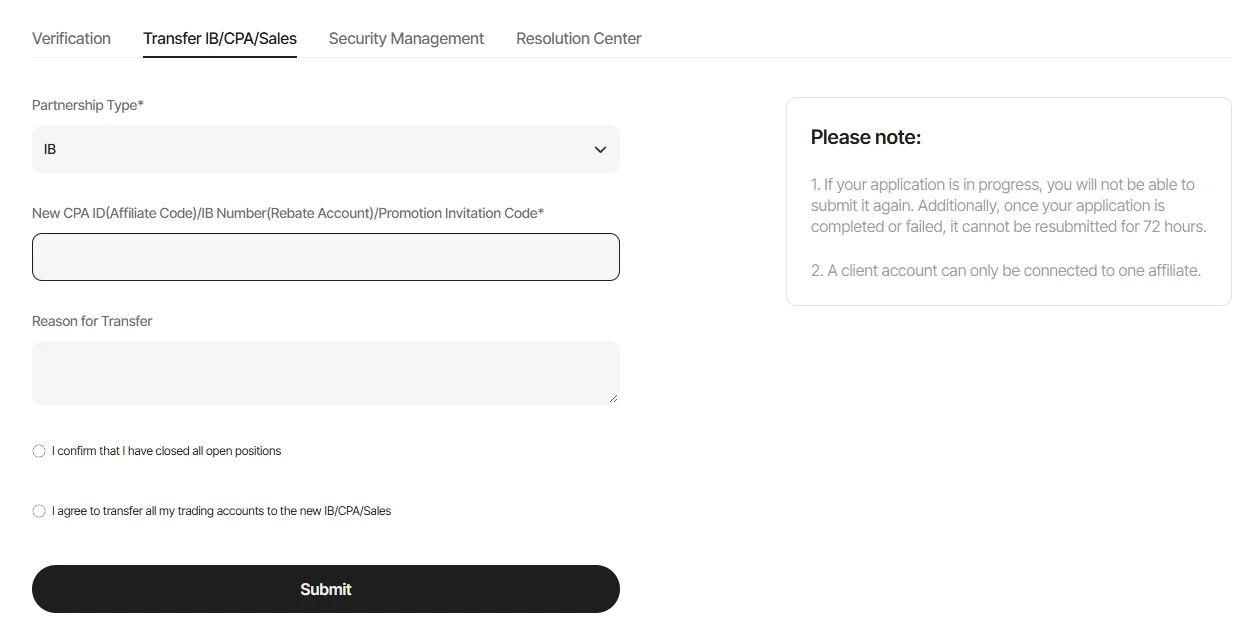
You'll see: Profile › Transfer IB/CPA/Sales. Enter 32372705 in the IB number field.
1.2After you submit
- Vantage reviews the request. Message us on WhatsApp once you've submitted, so we can confirm when your account shows under Guild Academy.
- If your account is already verified, step 2 will already be done. Check it shows Verified and move on.
Verify your identity and address
Vantage has to approve your account before you can open a live trading account. Verification has two levels: Lv2 (your ID) and Lv3 (your address).
2.1Complete Lv2 and Lv3
- In Vantage, select Profile (top right), then Verification, or select Verify Now when prompted.
- Lv2: confirm your name, nationality and date of birth, then photograph your physical ID.
- Lv3: confirm your country, then upload a proof of address dated within the last 3 months.
- Wait until both show Verified.
Open a live account and deposit $500
Your contest strategy runs from a live trading account in USD; this is the account you trade yourself. Signal Providers need one deposit of at least USD 500 into it.
3.1Open the account
- Select Account at the top, then Account Management, then Open Account.
- Choose a Live trading account (not a Copy Trading account) in USD.
- Choose leverage 1:500 (contest accounts are meant to trade at 1:500).
3.2Make one deposit of $500 or more
- Go to Funds → Deposit and choose your new live account.
- Deposit USD 500 or more in a single deposit.
You pay any deposit fees or bank charges. No part of your deposit goes to Guild Academy.
Apply as a Signal Provider
Your Signal Provider profile is how your results are tracked in the contest. Apply as soon as your $500 deposit has arrived.
4.1Option A: in the Vantage app
- Log in to the Vantage app.
- Go to Trade, then Copy.
- Tap Become a Signal Provider.
- Read and accept the Signal Provider Terms and Conditions.
- Tap Submit to apply.
4.2Option B: in the Client Portal
- Log in to the Client Portal.
- Select Copy Trading, then Signal Provider.
- Read and accept the Signal Provider Terms and Conditions.
- Click Submit.
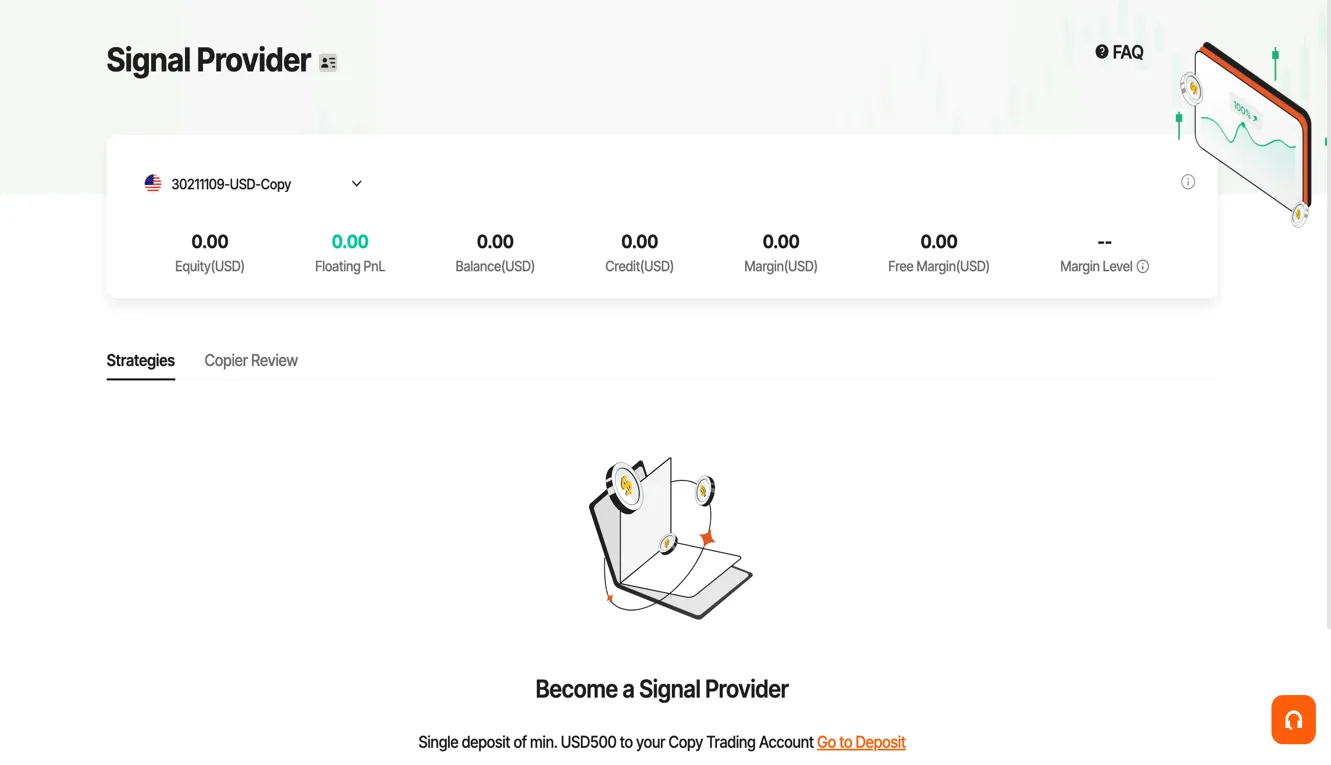
You'll see: Copy Trading › Signal Provider, asking for a single deposit of min. USD 500.
4.3After you apply
- Wait for Vantage to approve you. Vantage doesn't publish a timeframe, and approval isn't automatic: they expect trading experience and integrity.
- Rejected or stuck? Contact Vantage through Live Chat or support@vantagemarkets.com with your live account number and a screenshot (hide sensitive details).
- You can also message us on WhatsApp at +971 58 659 3299.
Create and name your public strategy
Once approved, make your profile public and create one named strategy. Write the exact name down: you'll use it on Guild Academy and in the entry form.
5.1Make your profile public
- Make sure your account verification is complete.
- In the app, open Profile (bottom right) and scroll to the Profit Sharing Summary.
- Tap Set as Public and check your profile now shows as public.
- On the web, open your profile's Info tab and add your details and a short description of your strategy.
5.2Create the strategy
- Go to the Signal Provider Center (Copy Trading › Signal Provider).
- Select Create New Strategy.
- Type the strategy Nickname (4–20 characters) and set Source Account to the same live account you opened and funded in step 3.
- Keep Strategy Equity Visible To Copiers switched on; the leaderboard reads it.
- Save, then Publish so it shows publicly.
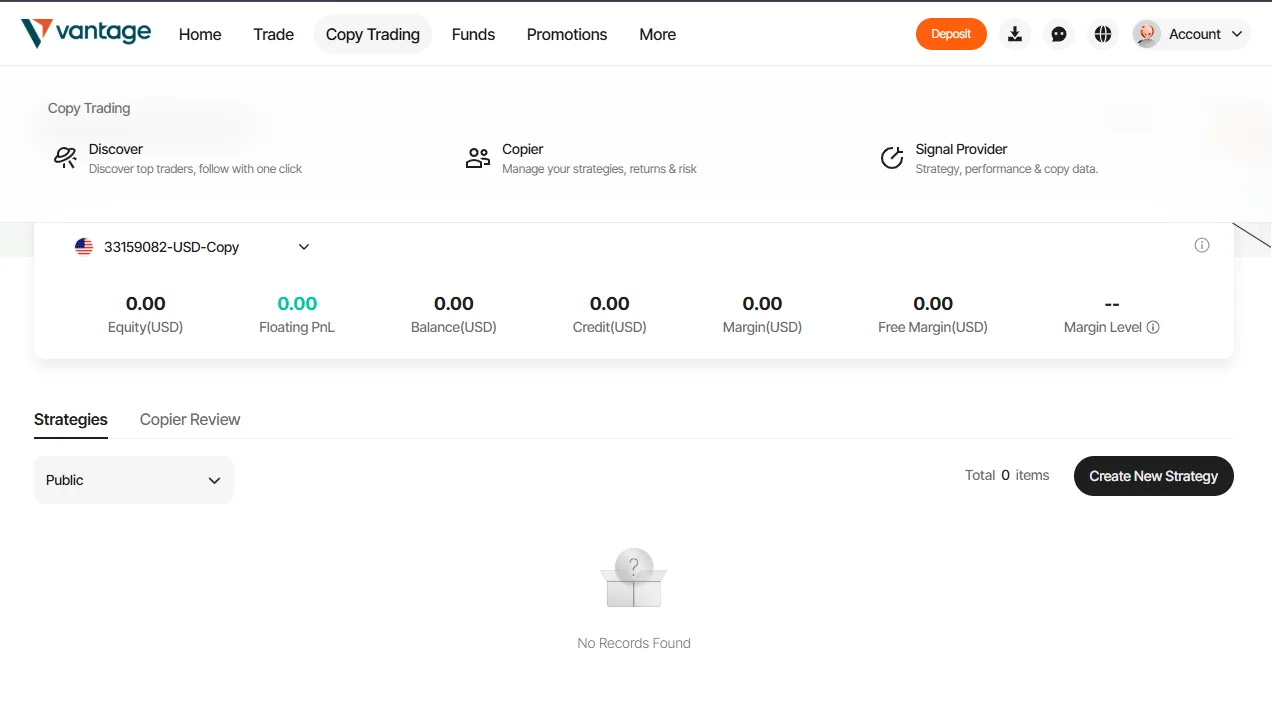
You'll see: Copy Trading › Signal Provider › Create New Strategy
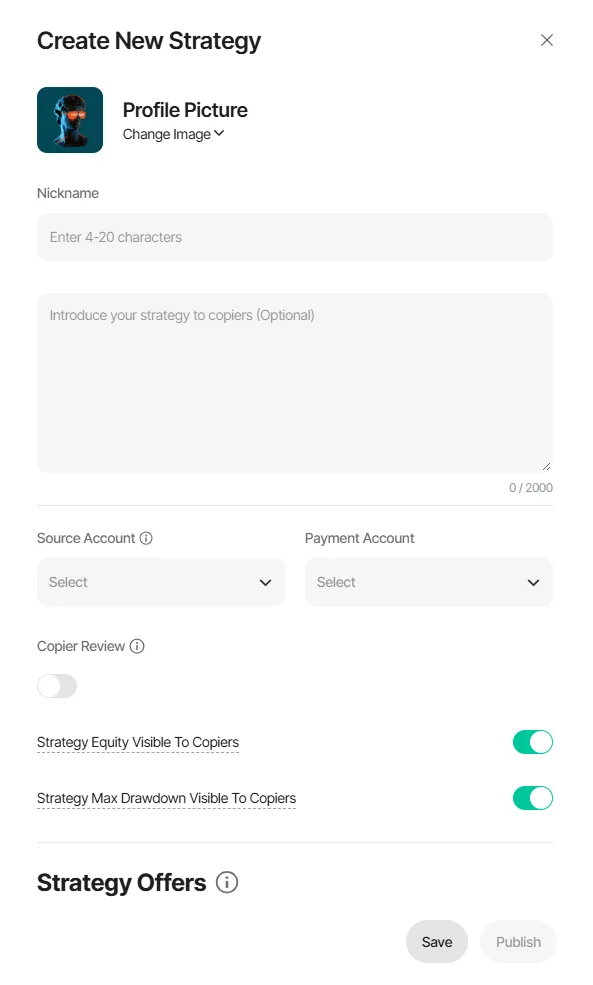
The Create New Strategy form: set Source Account to your funded live account, then Save and Publish.
5.3Copy your strategy link
- Open your published strategy's page in Vantage.
- Copy the address from your browser bar. It looks like …/discoverDetail?strategyId=1234567
- Keep it with your strategy name: you'll paste it into the entry form in step 8.
Join Guild Academy
The contest is for Guild Academy members. Your entry is checked against your Guild Academy membership using the email you sign up with.
- Open the Guild Academy community and sign up or log in.
- Make sure your Guild Premium membership is active.
- Note the email address you use there. You must use the same one in the entry form.
Match your profile name
We link your Guild Academy profile to your Vantage results by name, so they must match exactly.
- In Guild Academy, open your profile and select Edit profile.
- Set your name to exactly the same name as your Vantage Signal Provider profile: same spelling, spaces and capital letters.
- Save your profile.
Submit your entry
Last step. The form asks for four things; have them ready before you open it.
The same email as your Guild Academy account (step 6).
Display name
Use your Signal Provider / strategy name. It's shown on the public leaderboard.
Vantage strategy link
The link you copied in step 5.3, containing strategyId=.
Vantage UID
Your Vantage user ID, shown in your Vantage profile. Not sure where? Message us.
That's it. Good luck!
Here's what happens next.
- We check your Guild Academy membership and that your Vantage account is under the Guild Academy link, usually within 24 hours.
- We record your starting equity when the contest begins on 30 November 2026.
- Trade between 30 November and 31 December 2026. Keep your strategy public and avoid deposits or withdrawals that distort your ranking.
- Follow the standings on the leaderboard, updated daily. The winner is announced on 1 January 2027.